

How it works
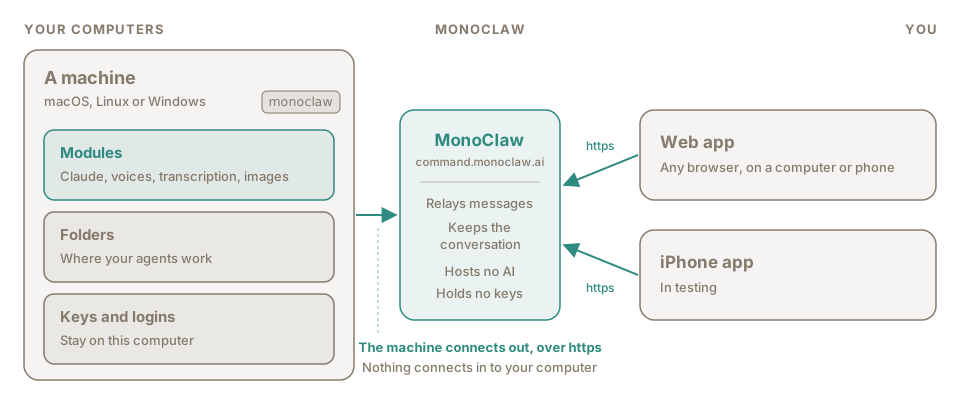
Your agents run on your computers. MonoClaw sits in the middle and passes messages between them and the apps you use.
What runs where
Section titled “What runs where”On your computer. A small program, monoclaw, from the npm package @monoclaw/machine. It runs the agents (Claude Code, with your own Claude login or API key), reads and writes files in the folders you allow, and makes voices, transcripts and images with the modules you add. API keys and logins are kept here.
In the middle. The MonoClaw service at command.monoclaw.ai. It relays messages between your machines and your apps, and keeps the conversation so every device shows the same thing. It hosts no AI and holds no keys.
In your hands. The web app, in any browser, and the iPhone app, in testing.
The machine connects out to MonoClaw over https and keeps that connection open. Nothing connects in to your computer, so there are no ports to open.
What the service stores
Section titled “What the service stores”Your account, your projects, the conversation (messages, agents’ replies and their steps), attachments, voice recordings and the audio made for agents’ replies. It also keeps each machine’s name, system, allowed folders and modules, and for each API key a name and its last four characters.
It does not store API keys or your Claude login. Messages are not end-to-end encrypted: the service can read them. Security has the detail.
The ideas
Section titled “The ideas”Machine
Section titled “Machine”A computer running monoclaw and connected to your account. It can be a laptop, a desktop or a server, and you can have several. See Machines.
Module
Section titled “Module”Something a machine can do: run agents with Claude, speak, transcribe, make images. A new machine has none; you add the ones you want. See Modules.
Connection
Section titled “Connection”An account on a module: the machine’s Claude login, an API key, or the machine itself for a module that runs locally. A module that uses API keys can have several connections, for example one key per budget.
Project
Section titled “Project”One shared conversation with one or more agents. Everyone who can open the project sees everything in it. See Projects and agents.
An AI worker with a name, on one machine, working in one folder on it. It runs on one connection of that machine, such as your Claude login. See Projects and agents.
Something an agent is given so it can do more than its own work in its folder: make images, or transcribe a recording. A tool is built on a module. See Tools.
Module or tool
Section titled “Module or tool”A module is what a machine can do. A tool is what an agent is given. You add the fal module to a machine once; then you make one or more image tools on it, each with its own name and settings, and tick them for the agents that should have them. Voices and the transcription of voice messages use modules directly, with no tool in between.
Space and organisation
Section titled “Space and organisation”A space is where projects, machines and tools live. You start with a personal space that only you use. An organisation is a space you share: owners build it, members chat in the projects they are given. See Organisations.
Permissions and access
Section titled “Permissions and access”Two settings decide what an agent may do. Access is the ceiling: Full, Read-only or Chat only. Permissions decide how often the agent asks you before it acts: Auto, Ask, Accept edits or Plan. See Security.